The best text to speech apps in 2026, compared
The best text to speech app for you in 2026: Speechify, ElevenReader, NaturalReader, built-in phone tools, AAC apps and MyVoice compared on voices and cost.
The best text to speech app depends on what you want it to do. If you mainly listen to documents, articles and books, a reader app like Speechify, ElevenReader or NaturalReader is the natural fit. If you need your phone to speak for you in conversation, an AAC-style app such as MyVoice, Proloquo4Text or Speech Assistant AAC (or Apple’s built-in Live Speech) is a better match. Below we compare the main options on voice quality, cost, ease of use and platforms, and say who each one suits best.
This is a research-based overview, built from each provider’s published pricing and features as of October 2026. We make MyVoice, so we’ve been careful to describe it alongside the others as fairly as we can, including where it isn’t the right choice.
Two kinds of text to speech app
Before comparing apps, it helps to know that “text to speech app” covers two quite different jobs.
- Reading apps take existing text (a PDF, web page, ebook or email) and read it to you. They’re built for listening: long documents, playback speed, bookmarks, sleep timers and importing files.
- Speaking apps take text you type and say it out loud to the people around you. They’re built for communication: speed of typing, saved phrases, one-tap speaking and a voice you’re happy to be heard in. This is the world of AAC (augmentative and alternative communication), which we explain in what is AAC.
Knowing which job you need will narrow the field quickly.
The best text to speech apps at a glance
| App | Best for | Platforms | Free option | Paid (as of October 2026) |
|---|---|---|---|---|
| Speechify | Listening to documents and web pages | iOS, Android, web, Mac, Windows, browser extensions | Yes, a small set of standard voices | Premium from $29/month, cheaper billed annually |
| ElevenReader | Natural-sounding long-form listening | iOS, Android, web | Yes, 10 hours of text to audio a month | Ultra $11/month, or $8.25/month billed annually |
| NaturalReader | Study and document reading across devices | Web, iOS, Android, Chrome extension | Limited free access | Lite, Plus and Pro plans, from $79/year |
| @Voice Aloud Reader | Budget Android reading of ebooks and PDFs | Android | Yes, with ads | $15 one-time premium licence |
| Apple Live Speech and Spoken Content | Free speaking and reading on iPhone | iPhone, iPad, Mac, Apple Watch | Built in | Free |
| Android Select to Speak and Reading mode | Free reading on Android | Android | Built in | Free |
| Proloquo4Text | Full-featured text-based AAC on Apple devices | iPhone, iPad, Mac, Apple Watch | No | $119.99 one-time (US App Store) |
| Speech Assistant AAC | Simple phrase-button AAC | Android, iOS | Free basic Android version | One-time upgrade |
 MyVoice MyVoice | Speaking out loud with natural AI voices | Android (iOS coming soon) | Yes, offline voices plus 3,000 AI characters/month | From $2.99/month |
Prices change often and vary by country, so check your store before subscribing.
Reading apps: listening to documents, articles and books
Speechify: best all-round document reader
Speechify is one of the best-known text to speech apps, and it’s built squarely for listening. It runs almost everywhere: iPhone, Android, the web, Mac, Windows and Chrome and Edge extensions. According to its pricing page, the paid Premium plan includes more than 1,000 natural voices in over 60 languages, listening speeds up to 5x, scanning printed pages with your camera, and AI summaries.
Cost: there’s a free plan with a small set of standard voices and speeds up to 1.5x. Premium is listed at $29 a month on monthly billing, with a discounted annual option, as of October 2026.
Good to know: it’s polished and feature-rich, but the best voices need the subscription, and it’s built for reading to you, not speaking for you.
Best for: students and professionals who listen to a lot of documents across several devices.
ElevenReader: best for natural-sounding long-form listening
ElevenReader is the reading app from ElevenLabs, a company with a strong reputation for realistic AI voices. Its pricing page lists over 1,000 voices and support for more than 90 languages, and the app reads PDFs, ebooks, articles and web links. It also includes a library of AI-narrated audiobooks.
Cost: the free plan gives you 10 hours of text to audio every month. The Ultra plan is $11 a month, or $8.25 a month billed annually, for effectively unlimited listening (with a daily fair-use cap) plus offline downloads, as of October 2026.
Good to know: the free allowance is generous, but like Speechify it’s a reader, not a conversation tool.
Best for: people who want the most natural voices for long reading sessions without paying straight away.
NaturalReader: best for study and document work
NaturalReader’s personal plans include a web app, mobile apps and a Chrome extension for reading documents and web pages.
Cost: according to NaturalReader’s help centre as of October 2026, individual plans are Lite ($79/year or $13.90/month), Plus ($119/year or $20.90/month) and Pro ($159/year or $25.90/month). The higher plans unlock its better AI voices and voice cloning. There is limited free access, mainly to its more basic voices, and audio made on personal plans is licensed for personal use only.
Best for: students and staff who want a reader that works across the browser and phone, on an annual plan.
@Voice Aloud Reader: best budget reader on Android
@Voice Aloud Reader (by Hyperionics) is a long-standing Android app that reads web articles, PDFs, documents and EPUB books aloud, with sentence or word highlighting, a sleep timer and reading lists. It uses the text to speech voices installed on your phone, so its voice quality depends on the engine you choose.
Cost: free with ads. A premium licence removes the ads for a one-time $15, according to the developer’s website.
Best for: Android users who read lots of ebooks and PDFs and prefer a one-off payment.
Built-in options: free text to speech already on your phone
You might not need to install anything. Both major phone platforms include capable text to speech for free. We cover setup step by step in how to use text to speech on iPhone and Android.
Apple: Spoken Content and Live Speech
On iPhone, Speak Selection reads text you highlight and Speak Screen reads the whole screen when you swipe down with two fingers from the top. Both live in Settings, under Accessibility.
Live Speech is the one to know about if you need to speak rather than listen. According to Apple Support, you type what you want to say and it’s spoken aloud in person or during phone and FaceTime calls. You can save favourite phrases, choose from many system voices, or use a Personal Voice that sounds like you. It needs iOS 17 or later on an iPhone XS or newer, and it’s free.
Best for: iPhone users who want free, reliable speaking and reading without another app.
Android: Select to Speak and Reading mode
On Android, Select to Speak reads aloud whatever you tap or select on screen. Google’s free Reading mode app shows web pages and articles in a clean, adjustable layout and reads them aloud with long-form voices, with speed control. Google’s Play Store listing says it supports English, French, Italian and Spanish, needs Android 9 or later, and works with TalkBack.
Best for: Android users who want free reading tools. Neither is designed for typing and speaking in conversation.
Speaking apps: text to speech for communication
If you’ve lost your voice, temporarily or long term, choose an app designed for conversation. Our guide to communicating when you’ve lost your voice may help too.
Proloquo4Text: best full-featured text-based AAC for Apple devices
Proloquo4Text from AssistiveWare is a well-established AAC app for people who can read and type. Its App Store listing highlights a single-screen layout, advanced word prediction, over 100 voices across 18 languages, Personal Voice support, and Apple Watch access.
Cost: $119.99 on the US App Store, as a one-time purchase (as of October 2026). Regional prices differ.
Good to know: it’s a deep, specialist tool, and it’s only available on Apple devices.
Best for: iPhone and iPad users who rely on typing to speak every day and want a mature, specialist app.
Speech Assistant AAC: best for simple phrase buttons
Speech Assistant AAC by ASoft is designed for people with speech difficulties, for example after a stroke or with MND/ALS or aphasia. You build categories of phrases as buttons, type freely, and show messages full screen in large text for noisy places. It uses the voices installed on your device.
Cost: on Android there’s a free basic version with a one-time in-app upgrade. On iOS it’s a one-time purchase, according to the developer.
Best for: people who mostly need a well-organised set of phrase buttons and value a simple, customisable layout.
MyVoice: best for speaking out loud with natural AI voices
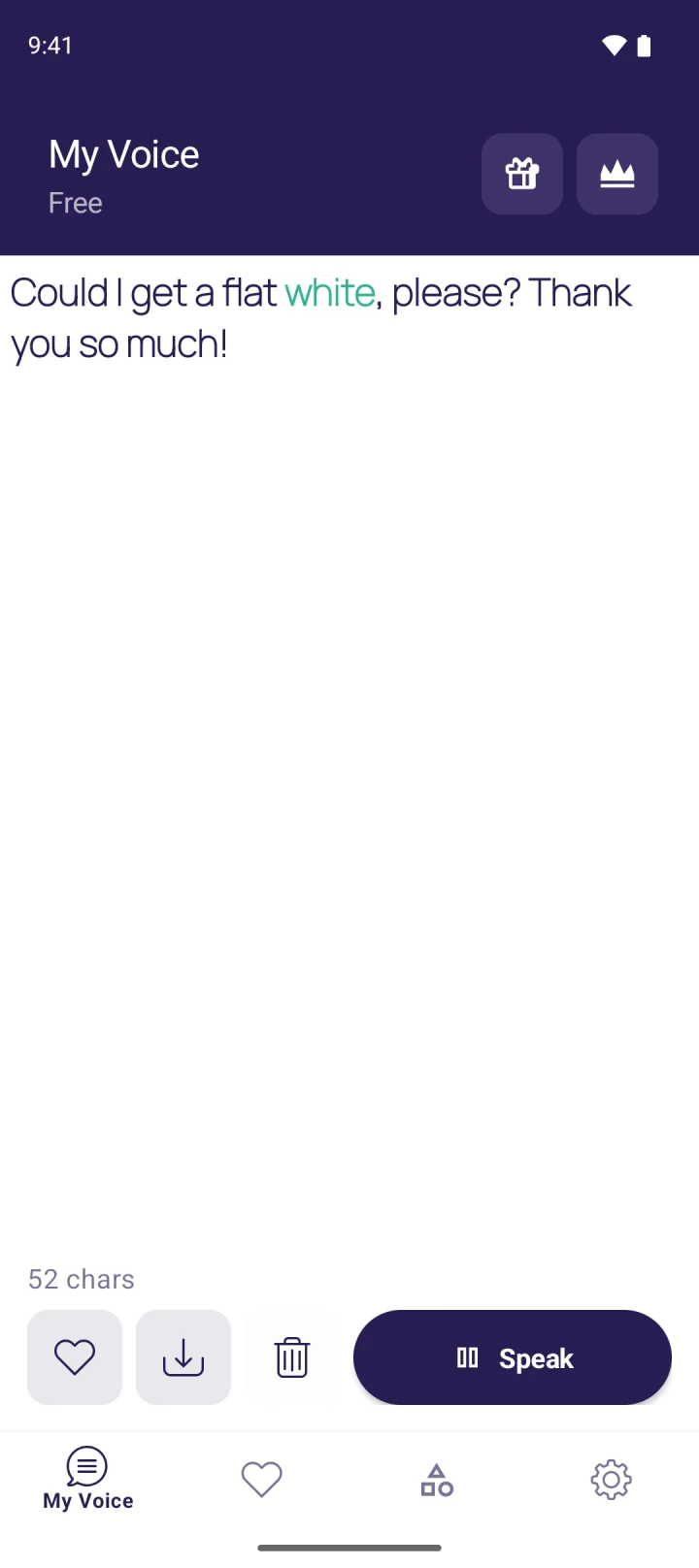
MyVoice is our app. It’s an AAC text to speech app: you type, tap Speak, and it’s read aloud in a natural voice. The focus is on everyday communication rather than reading documents.
What it does well:
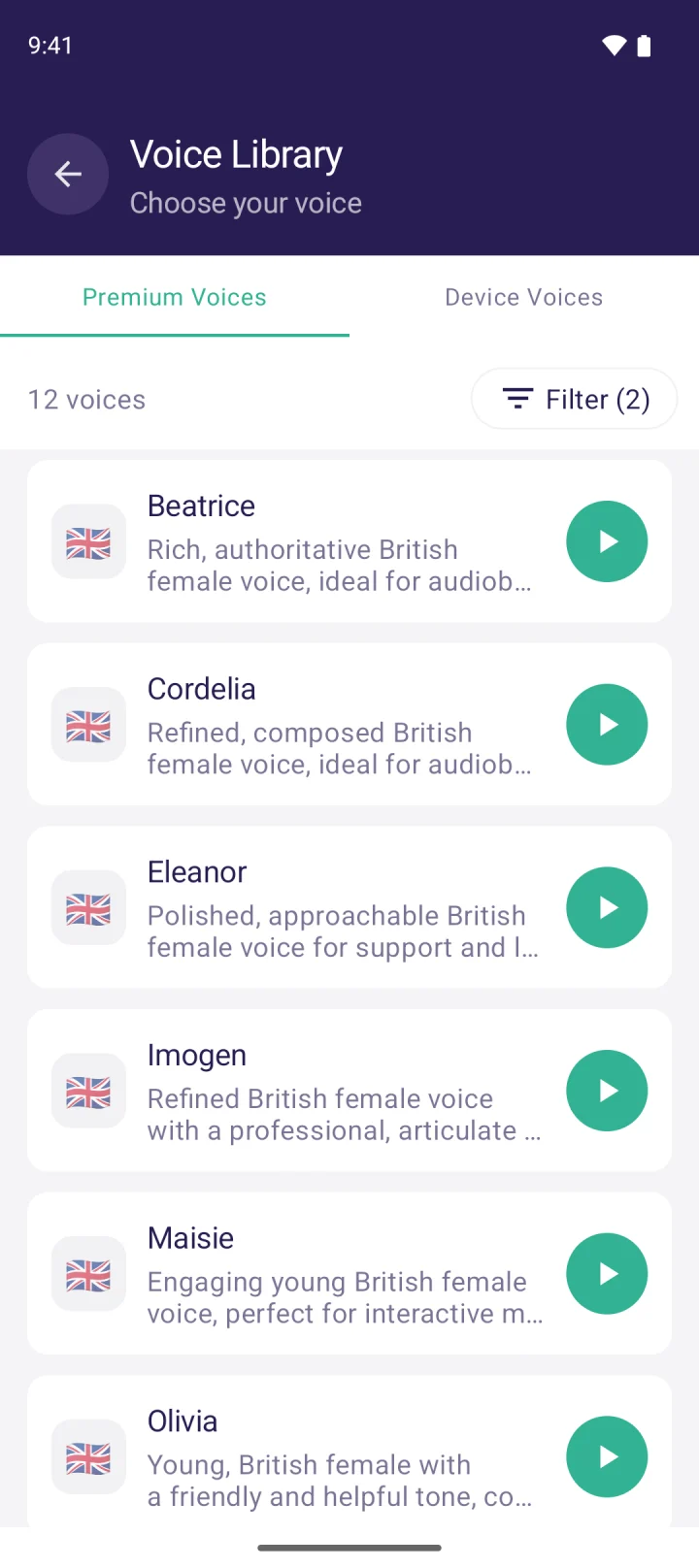
- Natural AI voices. 278 AI voices across 15 languages and 24 regional accents, including US, UK, Australian, Indian, Irish and Nigerian English. You can filter by gender, age and accent and preview any voice before choosing.
- One-tap speaking. Saved phrases, favourites and phrase categories let you say common things instantly. Speak as you type, live word highlighting and clear-after-speaking keep conversation moving.
- A useful free tier. On-device voices that work offline at no cost, plus 3,000 AI voice characters a month (about 600 words).
- Low-cost plans. Lite is $2.99/month for 200,000 characters (about 40,000 words), Standard is $4.99/month for 500,000, and Premium is $8.99/month for 1,000,000. Paid plans add audio clip downloads, so you can save speech as an audio file. See pricing for details.
- Accessibility. Works with TalkBack, with adjustable text size and, for on-device voices, speed and pitch.
Its limits:
- Android only for now. MyVoice is on Google Play today. The iOS version is coming soon to the App Store but isn’t available yet.
- Not a document reader. It doesn’t import PDFs, ebooks or web pages. If listening to documents is your main need, one of the reading apps above will serve you better.
- No symbol boards. It’s text based, so it suits people who can read and type.
Best for: people who need to speak in daily life, whether because of a long-term condition, a voice that tires easily or a temporary loss of voice, and who want a natural voice at a low monthly cost. You can hear every voice on our homepage before installing. More on this use case on our page for AAC users.
How to choose the best text to speech app
1. Do you want to listen, or to speak?
This is the big one. For listening to documents and books, pick a reader (Speechify, ElevenReader, NaturalReader, @Voice). For speaking in conversation, pick a speaking app (MyVoice, Proloquo4Text, Speech Assistant AAC, or Live Speech on iPhone).
2. How natural does the voice need to sound?
Built-in phone voices are clear but can sound flat over long passages or in conversation. Modern AI voices are far more expressive. If you’ll be heard by other people every day, or listen for hours, voice quality matters a lot. Our guide to the most realistic AI voices explains what to listen for.
3. What can you spend?
Free options are genuinely useful, but most limit the better voices (see our guide to free text to speech). Among paid options, compare the monthly cost against how much you’ll actually use. One-time purchases suit some people better than subscriptions.
4. Which devices do you use?
Check the app is on your phone’s platform before you get attached to it. Proloquo4Text and Live Speech are Apple only, @Voice is Android only, and MyVoice is currently Android only.
5. Does it need to work offline, and is it easy on a bad day?
Cloud AI voices usually need a connection, so look for on-device voices if signal is poor. For communication, large buttons and saved phrases matter more than feature lists. Try the free version before you pay.
FAQ
What is the best text to speech app for Android?
It depends on the job. For reading documents, ElevenReader, Speechify and @Voice Aloud Reader are all on Android, and Google’s Select to Speak and Reading mode are free. For speaking out loud in conversation, MyVoice and Speech Assistant AAC are designed for that.
What is the best TTS app for iPhone?
For reading, Speechify, ElevenReader and NaturalReader all have iPhone apps, and Apple’s Speak Screen is free. For speaking, Apple’s built-in Live Speech is a good free starting point, and Proloquo4Text is a well-regarded paid AAC app. MyVoice is coming to iPhone soon.
Is there a completely free text to speech app?
Yes. The built-in tools on iPhone and Android are free, and several apps have free tiers. The trade-off is usually voice quality or a monthly limit on the best voices. MyVoice’s free tier includes unlimited offline on-device voices and 3,000 AI voice characters a month.
Which text to speech app has the most realistic voices?
Apps built on modern AI voices, including ElevenReader, Speechify Premium and MyVoice, sound far more natural than older robotic voices. Realism is personal, so listen to samples before deciding. You can hear all of MyVoice’s voices on our voice sampler.
Should I see a professional before choosing a communication app?
If you’re losing your voice or have a condition affecting your speech, it’s worth talking to your GP or a speech and language therapist. They can help you choose tools that fit your needs, and a text to speech app can work alongside their support.
If speaking out loud is what you need, MyVoice is free to try on Android, and it’s built to make that as quick and natural as possible.
Download MyVoice
Try for free
Natural AI voices, saved phrases, and full accessibility support on iOS and Android.