The best AAC apps in 2026: a guide for users, families and SLPs
The best AAC apps in 2026 compared: symbol-based and text-based options for adults and children, including autism and free AAC apps, with tips on choosing one.
The best AAC app depends on the person using it. For children and adults who are still building language or literacy, symbol-based apps such as Proloquo2Go, TD Snap, TouchChat, LAMP Words for Life and Avaz are the established choices. For people who can read and spell, text-based apps such as Proloquo4Text, Predictable, Spoken and MyVoice are usually faster and cheaper, and Cboard is a free, open-source starting point.
This guide is a research-based overview, built from each provider’s published features and pricing as of October 2026. We haven’t hands-on tested or benchmarked these apps, and we make one of them (MyVoice), so we’ve tried to be fair and clear about where each one shines. An AAC app is a big decision, and the most reliable way to make it is with a speech and language therapist (SLT), called a speech-language pathologist (SLP) in the US.
What an AAC app does
AAC stands for augmentative and alternative communication: any tool or strategy that adds to or replaces speech. An AAC app turns a phone or tablet into a speech-generating device, so the user can select symbols, words or typed text and have them spoken aloud. If you’re new to the term, start with our beginner’s guide, what is AAC?
Symbol-based vs text-based AAC apps
Most AAC apps fall into one of two camps, and this split matters more than any single feature.
| Symbol-based AAC | Text-based AAC | |
|---|---|---|
| How you communicate | Tap pictures and words arranged in a grid | Type with a keyboard, helped by prediction and saved phrases |
| Best for | People still developing language or literacy, many young children, some autistic people and people with aphasia | Literate teens and adults, for example after MND/ALS, stroke without significant aphasia, laryngectomy or temporary voice loss |
| Strengths | Builds language, consistent layouts support motor learning, no spelling needed | Say anything you can spell, faster setup, often cheaper |
| Trade-offs | Larger vocabularies take time to learn and customise; usually more expensive | Needs reliable spelling; typing can be slow without good prediction |
Some apps blur the line. TD Snap includes both symbol-supported and text-based page sets, and most symbol apps include a keyboard for users as literacy grows.
Symbol-based AAC apps
Proloquo2Go (AssistiveWare)
Proloquo2Go is one of the best-known AAC apps and a common first recommendation for children. AssistiveWare describes more than 27,000 symbols, its Crescendo vocabulary designed to grow from single words to full sentences, and over 100 free adult and children’s voices, with support for Apple’s Personal Voice. It’s available in English, Spanish, French and Dutch.
- Platforms: iPhone, iPad and Mac, with an Apple Watch companion.
- Price: $249.99 one-off on the US App Store as of October 2026 (regional prices vary).
Proloquo (AssistiveWare)
Proloquo is AssistiveWare’s newer, subscription-based symbol-supported app for iPhone and iPad. It includes features such as Thinking Space for building thoughts and lists, and free sharing with teachers, therapists and family. The Proloquo Coach companion app for parents is included.
- Platforms: iPhone and iPad.
- Price: $9.99 a month or $99.99 a year after a one-month free trial, per AssistiveWare’s site as of October 2026.
TouchChat HD (PRC-Saltillo)
TouchChat lets the user choose from a range of vocabulary files made of pages and buttons, which can be fully customised. Optional vocabularies include WordPower, a word-based vocabulary available in English, Spanish, French and Mandarin.
- Platforms: iPhone and iPad.
- Price: $74.99 on the US App Store, or $149.99 for the version bundled with WordPower, as of October 2026. A free TouchChat Discover app is also listed.
LAMP Words for Life (PRC-Saltillo)
LAMP Words for Life combines the Unity language system with Language Acquisition through Motor Planning (LAMP) principles. The idea is that every word has one consistent motor pattern, so finding it becomes automatic over time. It’s widely used with autistic children and others with developmental disabilities, and symbols are paired with text to support literacy.
- Platforms: iPhone and iPad.
- Price: $149.99 on the US App Store as of October 2026, with a free “Discover” version also listed.
TD Snap (Tobii Dynavox)
TD Snap is notable for its range of page sets: Core First (symbol-supported, with a path to literacy), Motor Plan, Text, Scanning, Aphasia and more. It’s designed to be used by touch, switch or eye gaze, and it’s the software on Tobii Dynavox’s dedicated devices, including eye-gaze devices.
- Platforms: iPad, and Windows on Tobii Dynavox devices.
- Price: free to download on iPad, but a subscription is needed to enable speech after a one-month trial. The App Store lists the Speaking Upgrade at $9.99 a month as of October 2026, with optional page sets such as PODD at extra cost.
Avaz AAC
Avaz is a symbol-based app built around core words presented in a research-based order, with over 40,000 SymbolStix pictures. It describes itself as suitable for children and adults, including autistic people and people with cerebral palsy, Down syndrome and aphasia.
- Platforms: iPhone, iPad and Android.
- Price: free download with a 14-day trial, then monthly, yearly or lifetime plans. A separate Avaz Lifetime Edition is $299.99 on the US App Store as of October 2026.
CoughDrop
CoughDrop is a cloud-based AAC app that syncs across devices, so the same boards work on a tablet, phone and computer. Parents, therapists and teachers can be linked to a communicator’s account to model language and edit boards remotely, and it includes usage reports.
- Platforms: web, iOS, Android, Windows and Mac.
- Price: CoughDrop’s published pricing is $9 a month or $295 one-off per communicator, with free supporter accounts and a free trial.
Cboard (free)
Cboard is a free, open-source AAC app that runs in a web browser, so it works on almost any device. It uses pictures and text to speech, lets you build custom boards, supports dozens of languages and can use recorded audio. It was developed with support from UNICEF.
- Platforms: web browser, Android, iOS and Windows.
- Price: free.
Text-based AAC apps
Proloquo4Text (AssistiveWare)
Proloquo4Text is AssistiveWare’s typing-based AAC app for literate users. Everything sits on a single screen to reduce effort, with self-learning word and sentence prediction, saved phrases, multiple conversations and more than 150 voices, including Personal Voice. It works with Switch Control and VoiceOver.
- Platforms: iPhone, iPad, Apple Watch and Mac.
- Price: $119.99 on the US App Store as of October 2026.
Predictable (Therapy Box)
Predictable is a text-based app with smart word prediction, phrase grids, and a strong set of access options, including switch access and head tracking. It supports 43 languages and bilingual setups. Its maker, Therapy Box, had its apps acquired by PRC-Saltillo in January 2026, with the apps continuing under their own brand names.
- Platforms: iPhone, iPad and Android.
- Price: $79.99 on the US App Store as of October 2026.
Spoken
Spoken is aimed at teens and adults. You tap to build sentences from predicted words that adapt to the way you talk, and it offers a choice of natural-sounding voices. Speaking is free; extras such as personalised predictions, saved phrases and lifelike voice customisation need Premium.
- Platforms: iOS, Android and Apple Silicon Macs.
- Price: free to speak; Premium is $12.99 a month, $99 a year or $249 lifetime (lifetime on the website only), per Spoken’s help pages as of October 2026.
 MyVoice
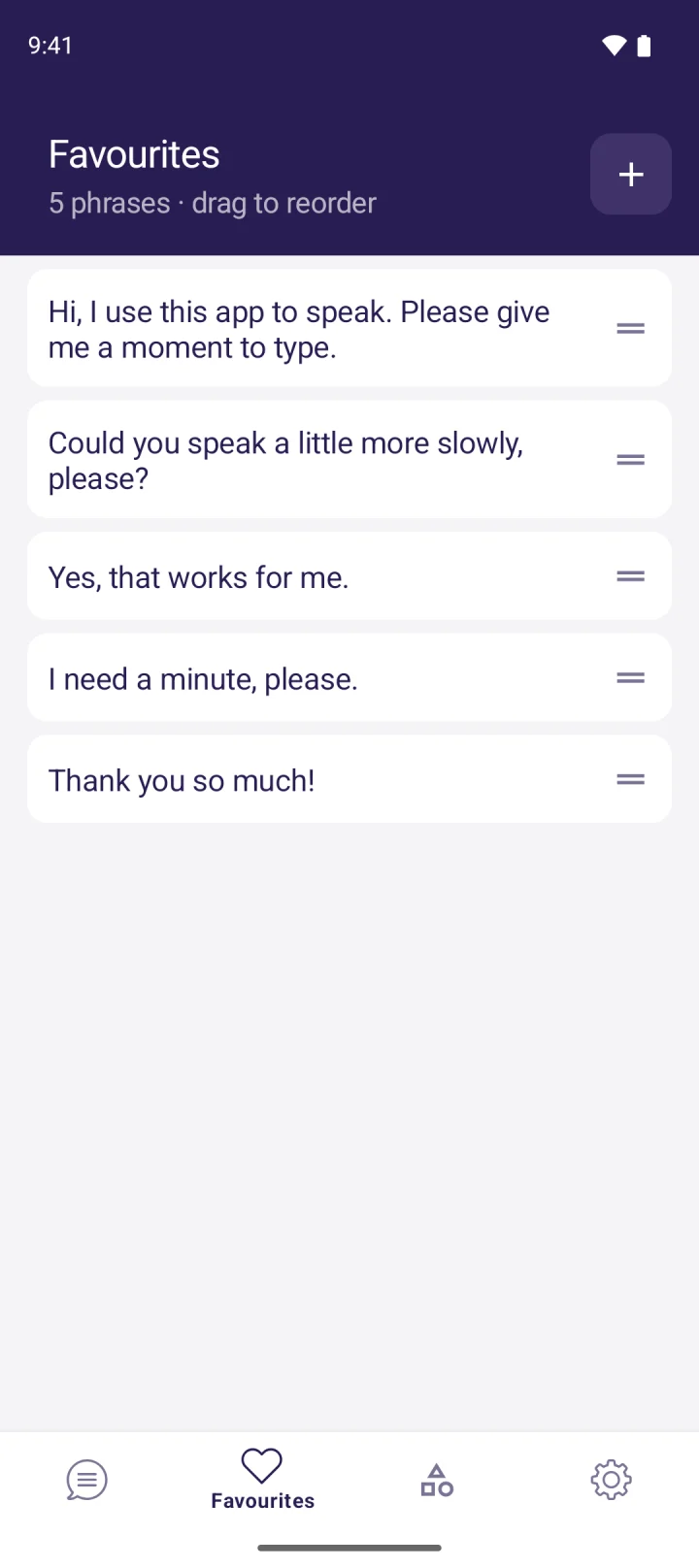
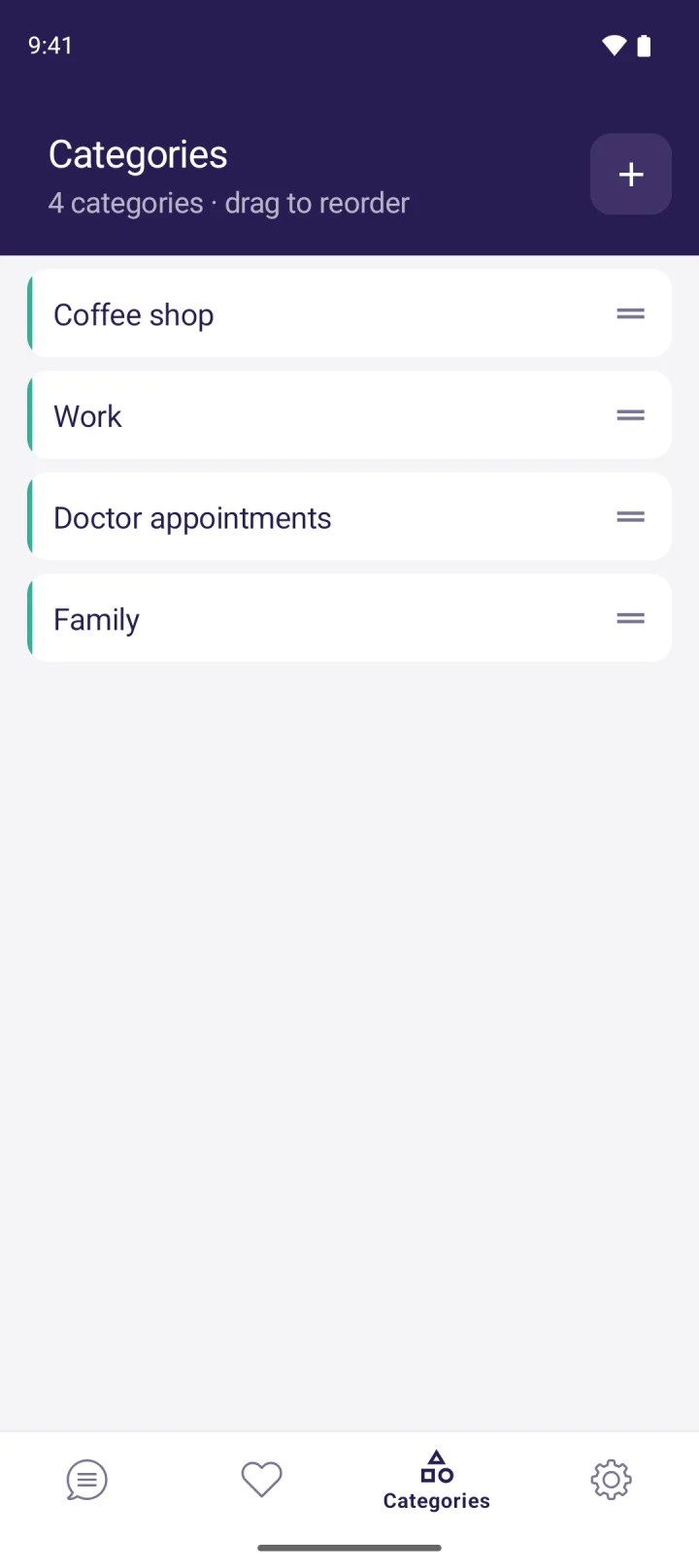
MyVoice is our app, so take this section with that in mind. It’s a text-based AAC app for people who can type and want a natural voice: you type, tap Speak, and it’s read aloud with live word highlighting. It has 278 natural AI voices across 15 languages (filterable by gender, age and accent), on-device voices that work offline, and saved phrases, favourites and categories for one-tap speaking. It works with TalkBack.
What it doesn’t do matters just as much. MyVoice has no symbol boards, and it has no switch scanning or eye gaze support, so it isn’t suitable for someone who needs those. It’s best for literate users who can use a touchscreen and want a low-cost, everyday voice.
- Platforms: Android now; iOS coming soon to the App Store.
- Price: free plan with on-device voices and 3,000 AI voice characters a month; paid plans from $2.99 a month. See pricing, or hear every voice without installing.
AAC apps compared at a glance
Prices are from each provider’s published pricing or the US App Store, as of October 2026, and may differ by region.
| App | Type | Platforms | Price (US) |
|---|---|---|---|
| Proloquo2Go | Symbol | iOS, Mac | $249.99 one-off |
| Proloquo | Symbol | iOS | $9.99/month or $99.99/year |
| TouchChat HD | Symbol | iOS | $74.99 ($149.99 with WordPower) |
| LAMP Words for Life | Symbol | iOS | $149.99 one-off |
| TD Snap | Symbol and text | iPad, Windows devices | Free app, speech $9.99/month |
| Avaz AAC | Symbol | iOS, Android | Subscription or $299.99 lifetime |
| CoughDrop | Symbol | Web, iOS, Android, Windows, Mac | $9/month or $295 one-off |
| Cboard | Symbol | Web, Android, iOS, Windows | Free |
| Proloquo4Text | Text | iOS, Mac | $119.99 one-off |
| Predictable | Text | iOS, Android | $79.99 on iOS |
| Spoken | Text | iOS, Android, Mac | Free core, Premium from $12.99/month |
| MyVoice | Text | Android (iOS soon) | Free, paid from $2.99/month |
The best AAC apps for adults
Adults who can read and spell usually get on best with text-based apps, because they can say exactly what they mean without navigating symbol pages. Proloquo4Text, Predictable, Spoken and MyVoice are all built around typing. For adults with aphasia after a stroke, a symbol-supported or aphasia-specific page set (such as TD Snap’s Aphasia set) may suit better, because reading and spelling can be affected too. Our guide to communication apps for nonverbal adults looks at adult needs and everyday situations in more depth.
AAC apps for autism
Many autistic children and some autistic adults use robust symbol-based systems such as LAMP Words for Life, Proloquo2Go, TD Snap or TouchChat, which support language growth and motor learning. Many literate autistic teens and adults who are non-speaking or speak intermittently prefer typing. There’s no single “autism app”: the right choice depends on the individual’s language, literacy and preferences, not the diagnosis.
Free AAC apps
Cboard is fully free and open source. Spoken lets you speak for free, with paid extras. MyVoice has a free plan with offline on-device voices and a monthly allowance of AI voice characters. TD Snap, Avaz and CoughDrop are free to download with trials, but need payment for full use. Phones also have free built-in options; see how to use text to speech on iPhone and Android.
How to choose an AAC app
Literacy and language
Can the person read and spell reliably? If yes, a text-based app is often fastest. If not, or if language is still developing, a robust symbol-based system is usually the place to start. Many people use both over time.
Motor access
Think about how the person will select things: direct touch, a stylus, a keyguard, switches, head tracking or eye gaze. If touch is unreliable or tiring, check access support carefully. TD Snap, Predictable and Proloquo4Text (with Switch Control) support alternative access, while some apps, including MyVoice, are touch-only.
Switch and eye gaze support
Eye gaze usually needs dedicated hardware, such as an eye-gaze device, alongside the software. An SLT or AAC service can arrange trials of these, which is far better than buying blind.
Voice and identity
The voice speaks for the person, so it should feel right: age, gender and accent all matter. Some apps support Apple’s Personal Voice or banked voices, and newer apps offer natural AI voices.
Funding and cost
Prices range from free to several hundred dollars, plus the cost of a tablet. Depending on where you live, AAC may be funded through health services, schools, insurance or charities. Ask your SLT what applies to you before you buy.
Assessment and trials
An SLT or specialist AAC service can assess language, literacy, motor access and vision, then trial options with the person. Use free trials and “lite” or “discover” versions to try before committing. The speech-language pathologists page explains how MyVoice can fit into an SLP’s toolkit for literate clients.
FAQ
What is the best AAC app?
There isn’t one best AAC app for everyone. Symbol-based apps such as Proloquo2Go, TD Snap and LAMP Words for Life suit people developing language; text-based apps such as Proloquo4Text, Predictable, Spoken and MyVoice suit people who can type.
Is there a free AAC app?
Yes. Cboard is free and open source, Spoken lets you speak for free, and MyVoice has a free plan. Others offer free trials.
What is the best AAC app for adults?
For literate adults, text-based apps are usually the best fit. For adults with aphasia, a symbol-supported or aphasia-specific system may work better. An SLT assessment helps decide.
Do AAC apps work on Android?
Some do. Avaz, CoughDrop, Cboard, Predictable, Spoken and MyVoice are on Android. Proloquo2Go and Proloquo4Text are Apple-only, and TouchChat and LAMP Words for Life are available as iOS apps.
Should I talk to a speech and language therapist first?
Yes, where you can. An SLT can match the app to the person’s language, literacy and access needs, arrange trials and advise on funding.
Download MyVoice
Try for free
Natural AI voices, saved phrases, and full accessibility support on iOS and Android.